Next.js 16 Icons & Manifest in the App Router: SVG Single Source
5 min read
SVG is the best thing that happened to the web (fight me)
Ever since the day I met SVG, I’ve been a fan.
The funny part is: the “discovery” was early, but the world needed 10+ years to treat it with the respect it deserves.
Open the way, friends. Let the web breathe. 😄
Anyway. Back to business.
The annoying reality: we still need bitmaps
For logos, logotypes, icons… SVG is the obvious choice.
But you already know the catch:
- Some platforms still expect PNG
- Some pipelines want fixed-size icon assets
- And producing the same icon at 6 sizes manually is… a special kind of boredom
This is where Next.js (App Router) quietly saves you.
PS: I used to avoid Next.js before App Router. Now I’m basically leaning on it.
The plan: a single SVG source
I like to keep the source files minimal:
public/icon.svg→ square, good for favicon / PWA iconspublic/logo.svg→ optionalpublic/logo-type.svg→ optional
Everything else is generated.
And by “generated”, I mean two things:
- Image files (PNG output) are generated at request time by Next.
- The stuff we’d normally have to read from disk (SVG strings + brand colors) becomes TypeScript modules.
Yes, committed code. I know. But it’s the good kind of boring.
The key idea: file conventions + a single source of truth
Next.js gives us file conventions for icons:
app/icon.tsxapp/apple-icon.tsxapp/manifest.ts
Yes, you can return an ImageResponse and let Next serve a PNG.
But here’s the part that matters if you care about keeping the project tidy:
- I don’t want to duplicate colors or SVG strings by hand.
- I don’t want any runtime file reads for something that is basically static.
- In my setup, using
runtime = "edge"for these files blocked the static generation behavior I rely on, so I run these routes onnodejs.
So I went with a simple rule:
Anything that is effectively static becomes generated code under
lib/generated/(and gets committed).
This keeps the "single source of truth" vibe:
- One SVG source in
public/ - One generator that turns it into importable constants
- Icons/manifest routes that stay boring and predictable
What gets generated (and why it matters)
If your theme tokens live in OKLCH (like mine does), you still need a couple “boring outputs”:
- RGBA strings for
ImageResponsestyles - HEX strings for the manifest
Also, you need SVG sources in a way that routes can consume without fs.
So the generator does the annoying stuff once:
- reads
public/icon.svg/public/logo.svg - produces
lib/generated/brand.ts(or similar) - exports things like
DEFAULT_BG_RGBA,DEFAULT_FG_RGBA,DEFAULT_BG_HEX,DEFAULT_FG_HEX
Now routes can just import and move on.
1) Icon rendering helper
This helper does one thing:
- take a size
- request the SVG as a data-uri (already tinted)
- render it as a PNG via
ImageResponse
But the real win is one small option:
iconScale
Because PWA maskable icons have a “safe zone” (icons get cropped into circles / squircles / whatever the platform feels like today).
So we render:
- favicon: full bleed (use the whole canvas)
- maskable: scaled down (safe zone)
// lib/icon.utils.tsximport { getIconDataUri } from "@/lib/svg.utils";import { ImageResponse } from "next/og";type RenderIconOptions = {bgColor?: string;fillColor: string;iconScale?: number; // 1.0 = full bleed, 0.65 = safe zone};export async function renderIcon(size: number, options: RenderIconOptions) {const { bgColor = "transparent", fillColor, iconScale = 1.0 } = options;const src = await getIconDataUri(fillColor);const imageSize = Math.floor(size * iconScale);return new ImageResponse((<divstyle={{width: "100%",height: "100%",display: "flex",alignItems: "center",justifyContent: "center",backgroundColor: bgColor,}}>{/* biome-ignore lint: required for ImageResponse */}<imgsrc={src}alt="Icon"width={imageSize}height={imageSize}style={{ objectFit: "contain" }}/></div>),{ width: size, height: size },);}
Notes:
- I’m using
next/og’sImageResponse. - The icon stays SVG in spirit, but gets served as PNG where needed.
iconScaleis the difference between “looks fine in Chrome” and “why is my icon decapitated on Android”.
2) Dynamic app/icon.tsx (multiple sizes)
I want multiple icon sizes without manually maintaining separate files.
So I expose multiple image variants via generateImageMetadata().
Also: in Next.js 16, params are Promises for these image routes too — so yes, we await id.
// app/icon.tsximport { DEFAULT_BG_RGBA, DEFAULT_FG_RGBA } from "@/lib/generated/brand";import { renderIcon } from "@/lib/icon.utils";export const runtime = "nodejs";export const contentType = "image/png";const SIZES = {small: 32,medium: 192,large: 512,} as const;export function generateImageMetadata() {return Object.entries(SIZES).map(([id, size]) => ({id,contentType,size: { width: size, height: size },}));}export default async function Icon({ id }: { id: Promise<string> }) {const iconId = (await id) as keyof typeof SIZES;const size = SIZES[iconId] ?? 32;const isFavicon = size === 32;return renderIcon(size, {// Favicon: transparent background, strong brand mark (full bleed)// Maskable: brand background, light icon (safe zone)bgColor: isFavicon ? "transparent" : DEFAULT_BG_RGBA,fillColor: isFavicon ? DEFAULT_BG_RGBA : DEFAULT_FG_RGBA,iconScale: isFavicon ? 1.0 : 0.65,});}
This gives you URLs like:
/icon/small/icon/medium/icon/large
…and you never again think about “where is the 192 icon”.
The favicon trick (yes, it’s intentional)
Notice this part:
- favicon background is
transparent - favicon fill is
DEFAULT_BG_RGBA
That looks weird at first.
But if your brand icon is designed as a shape that expects a background, a transparent favicon can look like… nothing.
So this flips it:
- for
32×32, we punch a strong brand shape - for maskable sizes, we do the classic “brand background + light icon in safe zone”
In other words: favicon behaves like a tiny logo.
Maskable behaves like a proper PWA icon.
3) app/apple-icon.tsx
Apple wants the classic 180×180 PNG.
Also: Apple doesn’t care about your feelings.
So we comply.
// app/apple-icon.tsximport { DEFAULT_BG_RGBA, DEFAULT_FG_RGBA } from "@/lib/generated/brand";import { renderIcon } from "@/lib/icon.utils";export const runtime = "nodejs";export const contentType = "image/png";export const size = {width: 180,height: 180,};export default async function AppleIcon() {return renderIcon(180, {bgColor: DEFAULT_BG_RGBA,fillColor: DEFAULT_FG_RGBA,iconScale: 0.65,});}
Same safe-zone philosophy.
4) app/manifest.ts (hex only)
Manifest files don’t want CSS variables or OKLCH. They want boring hex.
So the generator gives us:
DEFAULT_BG_HEXDEFAULT_FG_HEX
…and we wire it like a responsible adult.
Also: when you reference favicon.ico, specifying sizes as 32x32 is a small but meaningful hint for tooling and validators.
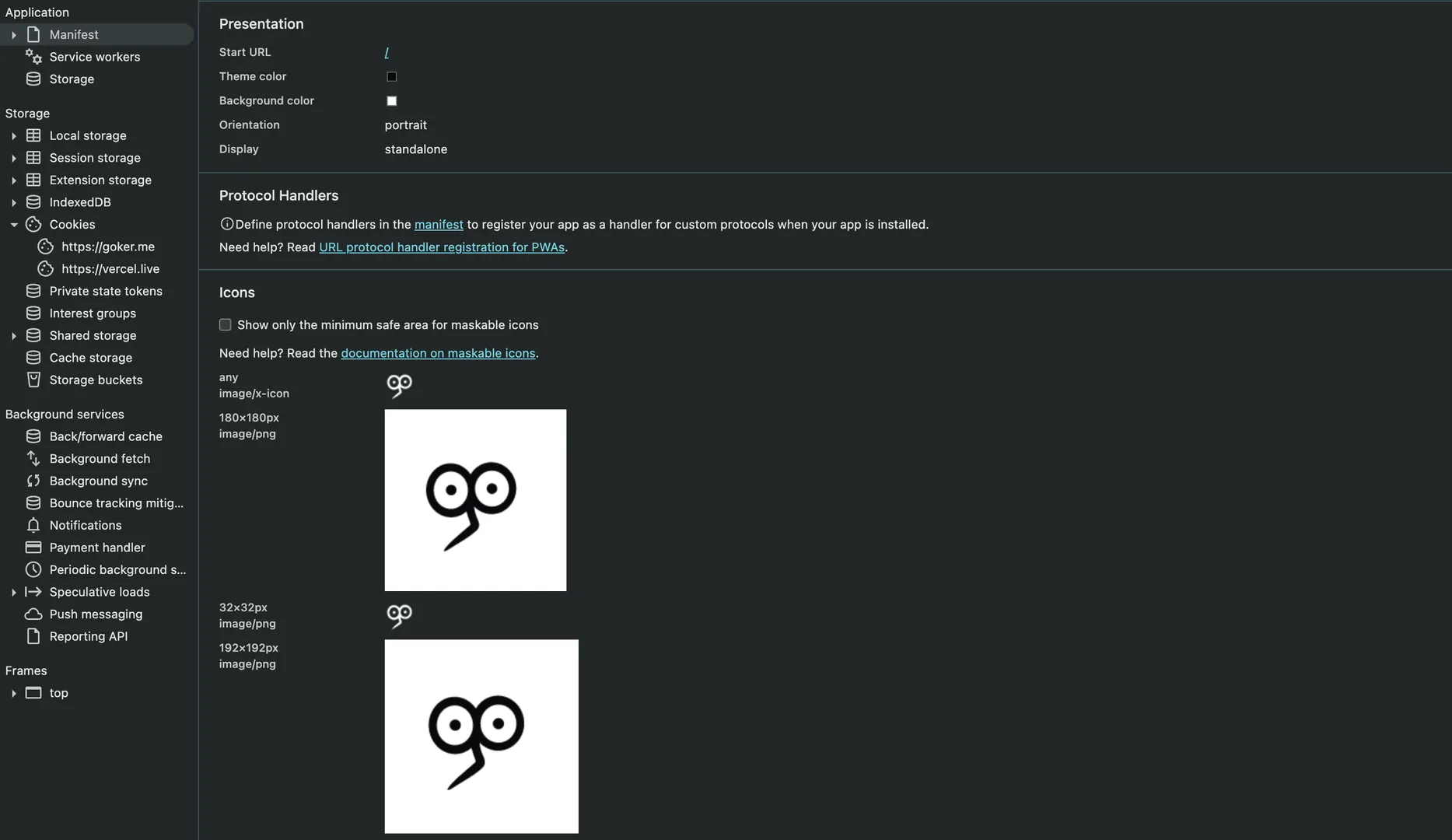
// app/manifest.tsimport type { MetadataRoute } from "next";import {DEFAULT_DESCRIPTION,DEFAULT_LOCALE,SHORT_NAME,SITE_NAME,} from "@/config";import { DEFAULT_BG_HEX, DEFAULT_FG_HEX } from "@/lib/generated/brand";export default function manifest(): MetadataRoute.Manifest {return {name: SITE_NAME,short_name: SHORT_NAME,description: DEFAULT_DESCRIPTION,lang: DEFAULT_LOCALE,start_url: "/",display: "standalone",background_color: DEFAULT_BG_HEX,theme_color: DEFAULT_FG_HEX,orientation: "portrait",icons: [{ src: "/favicon.ico", sizes: "32x32", type: "image/x-icon" },{ src: "/apple-icon", sizes: "180x180", type: "image/png" },{ src: "/icon/small", sizes: "32x32", type: "image/png" },{src: "/icon/medium",sizes: "192x192",type: "image/png",purpose: "maskable",},{src: "/icon/large",sizes: "512x512",type: "image/png",purpose: "maskable",},],};}
The purpose: "maskable" is the little hint that makes Android treat your icon like a real citizen.
Monocolor icons + theme tokens = easy mode
If your icon is monocolor (not monochrome — monocolor 😄), this setup is extra nice:
- Your SVG stays clean
- You can recolor it by injecting a theme token
- Your icons stay consistent across light/dark themes (if you want)
I’m using shadcn/tailwind and staying loyal to OKLCH tokens, so this conversion layer keeps everything aligned.
Bonus: the same trick scales to OG images too
Once you get comfortable with ImageResponse, you start seeing the world differently.
Example:
- A static OG template route can be just React.
- A dynamic OG route can exist when you actually need it (fetch post data, process images, preserve GIFs, etc.).
And you can keep the same “single source of truth” aesthetic by making your OG layout a reusable template.
In my setup, the template is basically:
renderStaticOgTemplate({ title, subtitle, badge, bgColor, textColor, fillColor })- it renders a logo that also uses a generated SVG data-uri
- it defaults to generated brand colors, so you don’t repeat tokens in every route
The part I enjoy most: the template is just React. No canvas mental gymnastics.
Quick recap
- Keep one SVG source (
public/icon.svg) - Generate brand tokens and SVG sources into
lib/generated/(commit them) - Serve PNG icons via
app/icon.tsx+generateImageMetadata() - Add Apple’s 180×180 via
app/apple-icon.tsx - Wire PWA with
app/manifest.ts(hex only)
SVG stays the source of truth.
But the web still gets the bitmaps it demands.
And everybody goes home happy.