Niche Problems and AI Nonsense: OBS Desktop Sharing Freezes
4 min read
Everything started with triggers like “go live”, “let’s stream”, “let’s just do a broadcast”. I already had the intention, but honestly, spending working hours on this kind of thing doesn’t give me much joy. Anyway, we somehow found ourselves stuck in this swamp.
At first, I was experimenting on the gaming side: low image quality, no audio, random issues. Whatever. I bought a capture card, installed OBS on macOS, routed the game console, and did the stream.
I was playing alone. Nothing to talk about. There’s music on macOS, so I thought I’d route that into the stream as well. Sometimes the audio cut out. I didn’t care much.
Later, we decided to do pair programming with Özkan — stream it, record video, the whole setup. By day three, the situation looked like this:
- Audio cuts out
- Video freezes
- A curious description from viewers: “the sound stutters”
In short, there are problems, but no clear indicator of what exactly is wrong.
We opened OBS logs and started asking GPT and Gemini for help. That’s exactly where everything went downhill. It had been 44 minutes since the new year started, and instead of celebrating, I spent another four hours trying to fix this nonsense.
The first wave of AI hallucinations started with a looped log message:
00:27:06.491: [coreaudio_get_device_name] failed to get name: 560947818
Assuming the issue was caused by virtual drivers — without questioning whether they were actually required by the system — it immediately jumped to suggestions like “remove Zoom or Teams audio drivers if they exist” or “delete inactive-looking sources in OBS”. According to the AI, solving the problem meant deleting 10+ sources and uninstalling every driver in sight :)
OBS log:
21:14:08.013: [Loaded global audio device]: 'Desktop Audio'21:14:08.013: [coreaudio_get_device_name] failed to get name: 560947818
There was no log that allowed us to map the device ID to an actual device. To diagnose it properly, you need to jump to the first occurrence of that log entry and check the audio device defined just above it inside OBS. It may be set to Default or Unplugged. In my case, the issue was caused by a Display Audio device added by OBS that listed no actual hardware and couldn’t be removed.
Now for the real problem: the stream freezing and audio dropping entirely. The suggestions kept coming — change monitor refresh rate, tweak OBS output settings — a flood of unrelated nonsense.
Relevant logs:
21:27:57.813: [coreaudio_get_device_name] failed to get name: 56094781821:27:57.815: [coreaudio_get_device_name] failed to get name: 56094781821:27:59.730: [ mac-screencapture ]: Stream stopped with error -3821 ("Stream was stopped by the system") 21:27:59.748: [ mac-screencapture ]: Stream stopped with error -3821 ("Stream was stopped by the system") 21:27:59.754: [ mac-screencapture ]: Stream stopped with error -3821 ("Stream was stopped by the system") 21:27:59.816: [coreaudio_get_device_name] failed to get name: 56094781821:27:59.820: [coreaudio_get_device_name] failed to get name: 560947818
These are the errors. It’s important to underline this clearly: the audio error and Stream stopped with error -3821 are independent. AI tools tend to assume that once the audio issue is fixed, everything else will magically resolve as well.
By the way, I needed to share the entire display because I was switching between multiple windows. The agents wasted about ten minutes of my life insisting that I should share individual windows instead.
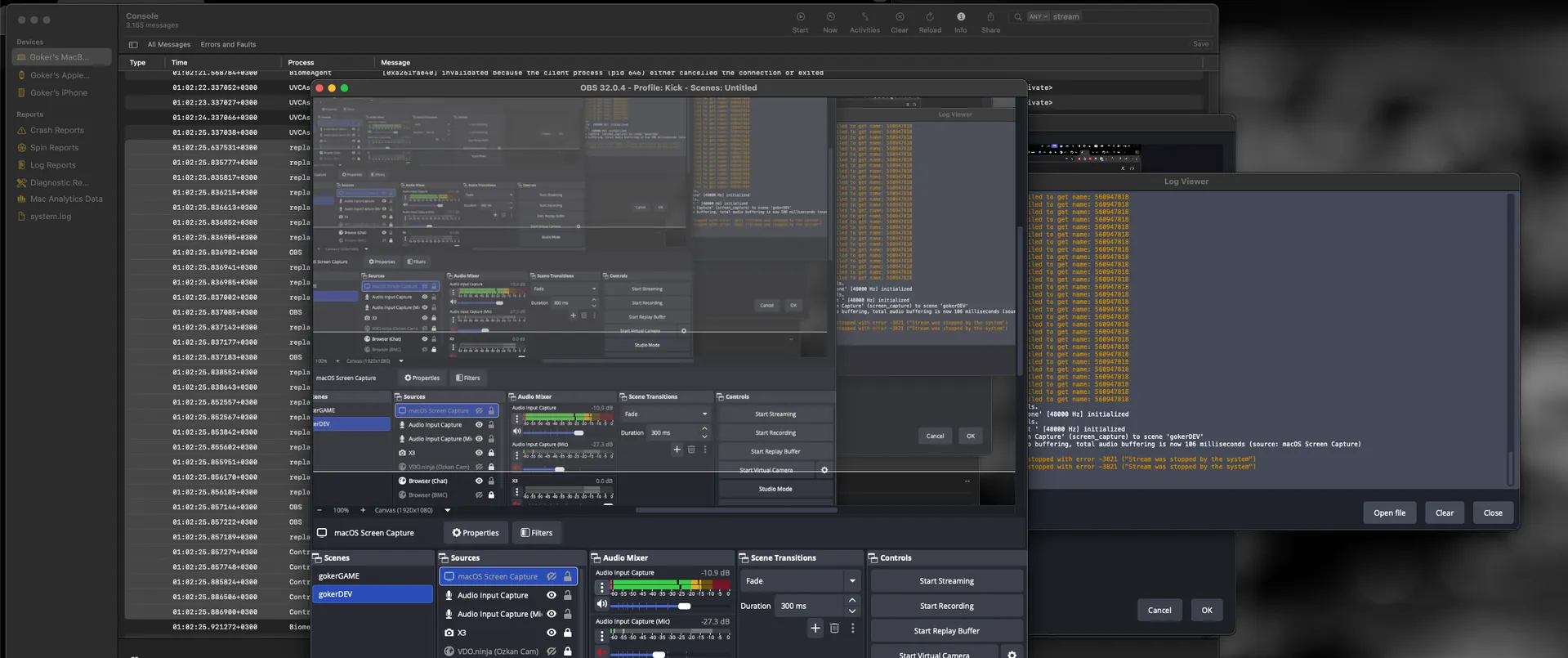
Eventually, we opened Console on macOS, started listening, and waited for the screen capture to freeze.
01:02:25.857: [ mac-screencapture ]: Stream stopped with error -3821 ("Stream was stopped by the system")
Once this appeared in the OBS log, we matched the timestamp and checked the corresponding system logs:
default 01:02:25.637531+0300 replayd [INFO] -[SCCaptureSession setupHealthMonitor]_block_invoke:1168 Health: captureSession=0x5b3d6c000 streamID=<private> screenframeCount=280 _audioFrameCount=250 _screenTimeSeconds=2907.284563 _audioTimeSeconds=2907.242161 _screenTimeDriftSeconds=0.00000000000000000000 compositeSessionMode=0 cameraframeCount=0 compositeFrameCount=0default 01:02:25.835777+0300 replayd [INFO] -[RPClient stopAllStreamsWithError:]:1401default 01:02:25.835817+0300 replayd [INFO] -[RPClient notifyManagerCallBack:forStreamID:withContentFilter:withStreamConfig:]:1088 control center client <private> managerStream=3default 01:02:25.836215+0300 replayd [INFO] -[RPClient stopAllStreamsWithError:]:1401default 01:02:25.836613+0300 replayd [INFO] -[SCCaptureSession stopAndInvalidateWithStreamData:userStopped:completionHandler:]:994 session=0x5b3d6c000 streamID=<private>default 01:02:25.836852+0300 replayd [INFO] SCRemoteQueue_StopSenderQueue:248 streamID=<private> remoteQueue=0x5b20a3c30default 01:02:25.836905+0300 replayd [INFO] SCRemoteQueue_StopSenderQueue:248 streamID=<private> remoteQueue=0x5b20a2460default 01:02:25.836982+0300 OBS [INFO] -[SCStreamManager stopRemoteQueue:type:]:120 0x6000016c82a0 streamId=<private>default 01:02:25.836941+0300 replayd [INFO] SCRemoteQueue_StopSenderQueue:248 streamID=<private> remoteQueue=0x5b20a2dc0default 01:02:25.836985+0300 replayd [INFO] -[SCScreenCaptureSession stopWithError:]:250 0x5b20f32a0: streamID=<private>default 01:02:25.837002+0300 replayd -[SLContentStream stop:]: self = 0x5b2248460default 01:02:25.837085+0300 OBS [INFO] -[SCStreamManager stopRemoteQueue:type:]:120 0x6000016c82a0 streamId=<private>default 01:02:25.837142+0300 replayd [INFO] SCCaptureSession_frameHandler:1604 Content stream frame status stopped for session=0x5b3d6c000 streamID=<private>default 01:02:25.837177+0300 replayd [INFO] -[SCAudioCaptureSession stop]:234 0x5b21512c0 streamID=<private>default 01:02:25.837183+0300 OBS [INFO] -[SCStreamManager stopRemoteQueue:type:]:120 0x6000016c82a0 streamId=<private>default 01:02:25.838552+0300 replayd AQMEIO_HAL.cpp:2554 aqmeio@0x5b2d10018: set input stream usage to 0 on device 193, err = 0default 01:02:25.838643+0300 replayd MEDeviceStreamClient.cpp:491 AQME Device-AudioTap-3B20BC71-B610-4CE1-9079-BED223517FB6: client stopping: <AudioQueueObject@0x5b21c0a00; [651]; rec>; running count now 0default 01:02:25.852557+0300 replayd [INFO] -[SCCaptureSession stopAndInvalidateAudioSession]:1092 audioDidStop=1 for session=0x5b3d6c000 streamID=<private>default 01:02:25.852567+0300 replayd [INFO] -[SCAudioCaptureSession dealloc]:130 0x5b21512c0 streamID=<private>default 01:02:25.853842+0300 replayd -[SLContentStream dealloc]: self = 0x5b2248460default 01:02:25.855602+0300 replayd [INFO] -[RPClient stopAllStreamsWithError:]_block_invoke:1412 Stopped stream=<private>default 01:02:25.855951+0300 replayd [INFO] -[RPClientProxy stream:didStopWithError:]:164default 01:02:25.856170+0300 replayd [INFO] -[RPClient notifyManagerCallBack:forStreamID:withContentFilter:withStreamConfig:]:1088 control center client <private> managerStream=2default 01:02:25.856185+0300 replayd [INFO] -[RPClientProxy streamDidStopWithConfiguration:contentFilter:]:196default 01:02:25.857146+0300 OBS [INFO] -[RPDaemonProxy stream:didStopWithError:]:1235default 01:02:25.857222+0300 OBS [INFO] -[SCStreamManager stream:didStopWithError:]:125 0x6000016c82a0 didStopWithError=Error Domain=com.apple.ScreenCaptureKit.SCStreamErrorDomain Code=-3821 UserInfo={NSLocalizedDescription=<private>} for streamID=<private>default 01:02:25.857189+0300 replayd [INFO] -[RPClient notifyManagerCallBack:forStreamID:withContentFilter:withStreamConfig:]:1088 control center client <private> managerStream=3default 01:02:25.857279+0300 ControlCenter [INFO] -[RPDaemonProxy streamDidStopWithConfiguration:contentFilter:]:1263default 01:02:25.857748+0300 ControlCenter [INFO] -[SCStreamInfo initWithConfiguration:contentFilter:]:65 0x600000f3b400 streamConfig=<private> contentFilter=<private>default 01:02:25.885824+0300 ControlCenter [INFO] -[SCContentFilter setContentsAndStreamType]:495 streamType=1 contentRect=<private> pointPixelScale=2.000000default 01:02:25.886506+0300 ControlCenter [INFO] -[SCControlCenterManager updateStreamsWithType:config:contentFilter:]_block_invoke:666 didMatch 1 with type 2 and object <private>default 01:02:25.886900+0300 ControlCenter Content sharing streams changed to count 0
After digging through the logs, the picture became clearer. The replayd service decides that the display (Display ID) has changed or disappeared, concludes that there is “no screen to capture”, emits error -3821, and terminates the capture session. A loose or low-quality cable can cause this.
According to AI, though, we’re supposedly doing desktop sharing while everything is visible on screen and there’s no obvious reason for a disconnect — yet it still cuts out :) When asked, AI happily lists every possible scenario:
If the monitor refresh rate was changed (e.g. 60Hz → 144Hz),If HDR mode was toggled,If the resolution was changed;OBS loses its hook and the system stops the stream claiming the video source changed or disappeared.
In other words: a list of possibilities, zero actual diagnosis.
Solution:
OBS > Sources > + > Deprecated > Display Capture
(yep, it is deprecated — no idea how long it will hold up, but there are no freezes)
For audio, the most practical solution was using eqMac so desktop audio could be routed both to OBS and to the speakers, <u>allowing volume control</u> without breaking the stream.
Don’t waste time on AI telling you 50,000 times to grant permissions, revoke permissions, and reboot. They won’t solve it. If you insist on identifying the root cause at the system level instead, you’ll get much closer to an actual solution.
Happy new year. Mine doesn’t look promising — it made that clear from the start.